Showing posts with label Hardware. Show all posts

Wednesday, December 25, 2019

,

Ergonomics for Gamers


We already know that gamers are, unsurprisingly, not immune to the negative effects of excessive idle sitting (sitting is the new smoking!), what kind of ergonomic gear should gamers seek out for their gaming  setup?

A gamer may have some different specific needs than your typical professional (lawyer, accountant, engineer, trader, etc), although the core ergonomic gear to help them fight the negative effects of sitting will be the same. Since most gaming rigs utilize more desk real estate, more consoles, and gaming paraphernalia, it’s important to choose ergonomic gear that support various gaming essentials.

If you are a gamer on a budget, here are the little environmental improvements you can work on to gradually introduce ergonomics to your gaming:

1.    Start with an Ergonomic Chair

            Most popular gamers may have panhandled their ergonomic chair sponsorships to you at some point, and this is because ergonomic chairs are one of, if not the most, popular ergonomic products geared solely towards gamers. Open any Youtube video with “streamer” or “gamer” in the title, and you will likely find them comfortably seated on their spankin’ new ergonomic gaming chairs.

But, getting a new ergonomic chair  (or an ergonomic wobble stool like the AnthroDesk Wobble Chair) is only one part of the battle. It is a good place to start, but ergonomic chairs will not entirely protect you from the effects of sitting. In fact, what most ergonomic chairs are designed to do is to make sure you are comfortable and you get sufficient lumbar support as you sit for hours at a time.
2.    Fight Carpal Tunnel by Supporting Your Wrist

Ergonomics is not only limited to spinal care; there is a whole line of wrist-support products in the market (like vertical mice), proving how vulnerable wrists can be to joint pains.
One common example of joint issues is carpal tunnel, which attacks the tendons and muscles around your dominant wrist. Most carpal tunnel sufferers share that their condition arose from excessive and unsafe use of work equipment, including computers. One way to help fight this is to use an ergonomic vertical mouse,

3.    Rest Your Soles on Comfortable Foot Pads/Mats

If you sit or stand for lengthy periods of time, experience leg fatigue or lower back pains as you sit, or you find yourself sitting cross-legged subconsciously because your body is trying to relieve bouts of strain, one of the best ways to deal with stress is to rest your soles comfortably on foot pads. This is also particularly helpful when your feet do not reach the floor when you are seated, or when the floor is too cold to sit or stand on.

            Foot pads will work regardless of how your entertainment room is constructed. Even with carpeted floors, a foot pad may still be beneficial if the goal is to enjoy added comfort as you work and play or if you want to eliminate back pains that often come when you stand or sit on uncomfortable surfaces for extended periods of time.

4.    Employ a Better Posture When Playing

Making the switch to ergonomic gear is only half the battle to conquering back pain and other issues that may arise due to excessive sitting or standing. To make healthy effects stick, it’s important that you start employing a better posture when working or playing.

Exercise, self-discipline, and mindfulness of your posture are just a few things to ensure that the positive changes you are making now are felt for years to come.

5.    Choose the Ideal Sit to Stand Desk

            The final piece of the puzzle and possibly the most important decision to make when working on your ergonomic gaming set-up is finding the perfect standing desk that will offer you both a comfortable and healthy gaming experience.
           
            To come up with the perfect choice, it often helps to list down what’s important to you as a gamer. Would it be more convenient for you if you could play on a gaming desk that accommodates multiple monitors or different consoles? Do you need an ergonomic standing desk that adjusts height automatically, or would you settle for a desk that can be manipulated manually?

            Also take the layout of your area into consideration. If your current computer desk is lodged at the corner of the room or between two adjacent walls, would you get the most value from an L-shaped standing desk?

            Identifying your needs is often the best first step to take when making any sort of purchasing decision.

Sunday, April 7, 2019

,
In case you missed.2 months ago At CES in Vegas Many Sophisticated technology were showcased that  literally blows our mind.At Ces 2019,Uber Flying Taxi was also showcased that revealed he future plans for Uber.


Uber's Flying Taxi 


Uber Flying Taxi


Uber is working Bell Aerospace to develop Air Taxis.At CES 2019 in Las Vegas, Bell revealed the latest iteration of its Nexus VTOL ( (vertical takeoff and landing) aircraft, which is being developed as the preferred platform for Uber's Elevate air taxi program.Uber's Elevate Air Taxi program is   expected to be launched in 2023 in major cities of USA.
Bell Nexus  will use six tilting ducted fans powered by a hybrid-electric propulsion system, with wings helping supplement lift in forward flight. The actual duct casings themselves will contribute lift during horizontal flight, as well, but the Nexus will rely on the six 8-foot-diameter fans for forward thrust and, while pivoted to the horizontal, takeoffs and landings. Inside, flight information or sightseeing data will be projected on the windows or through goggles for passengers.Bell Nexus is designed by Bell flight which is aircraft manufacturer of commercial and military helicopters.We don't know how much a ride would cost you but I am sure that it will cost a fortune.


But we'll have to wait till mid 2020's if we want to experience this aircraft because it may launch in 2023 in USA but I am sure that it will launch alot later internationally.


Read more about some cool gagdets that will showcased at this year's CES.

Friday, March 29, 2019

,


Just as with your smartphone, Now you can have Internet access enables  with whole world of potential capabilities, like message notifications, GPS navigation and calendar synchronization. And of course, a Bluetooth connection to your phone means the watch can help you place calls or send and receive messages through Smart Watches.


Advertisement
World Bee Tech Offers a hosting platforms for your website/blog with 24/7 Security .
We Offer the latest Marketing tools for your Website/blog to optimize your SEO & Sales .
24/7 Technical Support & Sales with phone numbers to call available in more than 56 countries & languages


Apple's series 4 Watch

Apple's Series 4 Smart watch was released back in the fall of 2018.Today this smart watch is considered as one of the best smart watch ever made.


Apple Series 4 watch has the largest Apple Watch display yet. New electrical heart sensor. Re-engineered Digital Crown with haptic feedback. Entirely familiar, yet completely new, Apple Watch Series 4 resets the standard for what a watch can be.


When comparing it with previous models,The  S4 64-bit dual-core processor and is up to two times faster than the S3 processor in the Series 3 Apple Watch. It also comes with a second-generation optical heart sensor and an electrical heart sensor, allowing it to do a whole lot more health monitoring including ECG tests.

Top reasons to buy this watch are

  • GPS
  • Over 30% larger display and 50% louder speaker
  • Electrical and optical heart sensors
  • Digital Crown with haptic feedback
  • 50% louder speaker
  • S4 Sip with faster 64-bit dual-core processor
  • Improved accelerometer and gyroscope for fall detection
  • Swim proof
  • Aluminum case

You can buy the Apple's Series 4 Smart watch for almost $400.

Sunday, January 13, 2019

,


Every Year many different Tech Giants gather in Las Vagas to show off their  freshest innovations at CES ( Consumer Electronic Show).This year's expo included Tv Screens,Mobiles,Cars that can fly and much more.Now lets talk about some interesting things that were showcased at CES 2019.

Electricity-Generating Tread Mill


ces 2019


VERDE is the industry’s first treadmill that is capable of harnessing the human power and converting it to utility grade electricity. The sleek, non-motorized design combines supremely low friction and flat-slat belt to create an approachable unit that feels remarkably natural and comfortable. Utilizing both mechanical and electrical braking systems the VERDE™ allows walking, jogging, running, sprinting or sled pushing features that cater to a broad spectrum of users, from deconditioned to elite athletes and is capable of capturing up to 200 Watts/hour of energy. 

Source : SportsArt

A Car with Actual Legs
        CES 2019

The Hyundai Elevate demonstrates its mammalian walking gaits. ... Debuted at the CES technology expo in Las Vegas on Monday, "Elevate" is designed for use at natural disaster sites, with users able to drive, walk, or climb over "the most treacherous terrain.The company says the vehicle is the future of the first responder industry and has “limitless” possibilities.
 John Suh, vice president and head of Hyundai Cradle, added that current rescue vehicles were only able to deliver first responders to the edge of a debris field, whereas Elevate can drive to the scene and climb right over flood debris or crumbled concrete.(But) this technology goes well beyond emergency situations,"

ces 2019


he said. "People living with disabilities worldwide … could hail an autonomous Hyundai Elevate that could walk up to their front door, level itself, and allow their wheelchair to roll right in. The possibilities are limitless."

Source : Hyundai 


Laundry Folder


CES 2019


Yes the future is here !! Now you can Buy a laundry folder only for a  $1000.This machine called Foldimate neatly folds your clothes. That’s it. You will have to pay around $980 to own it.


Source : Foldimate


GRIFFIN WIRELESS CHARGER


CES 2019

CES 2019 featured a few exciting announcements for wireless chargers, powerful fast chargers. Its PowerBlock Wireless Fast Charging Pad is a 7.5-watt Qi charger with a spot for both an iPhone and an Apple Watch, and it’ll go on sale within the next couple months for $79.99. An iPhone-only version was also announced.

Griffin also debuted two other wireless chargers. The PowerBlack Wireless charging stand can transform from being a stand to a flat pad, and the Reserve Wireless Charging Bank is a 5,000mAh portable battery back with a wireless charging contact point for your phone. The chargers will cost $39.99 and $34.99, respectively, when they launch in Q1 2019.


Source : Griffin

Saturday, January 12, 2019

,
> MSI GS65 


MSI GS65


Stealth Thin

Elegant. Portable. Powerful. The best gaming laptop you can buy

CPU: Intel Core i7-8750H | GPU: Nvidia GeForce GTX 1070 Max-Q | RAM: 16GB DDR4-2400MHz | Screen: 15.6-inch FHD (1,920 x 1,080) wide-view 144Hz | Storage: 512GB M.2 SSD | Battery: 82 Whr | Dimensions: 9.75 x 14.08 x 0.69 inches | Weight: 4.14 lbs


Sleek and powerfulLong battery lifeNo G-Sync

The GS65 Stealth Thin delivers everything I want in a gaming laptop. It has the convenience and portability of a productivity notebook—light and thin enough that I can toss it in my backpack, tote it to meetings, and comfortably use it on the couch—married with the internal guts of a gaming PC—powerful enough to play the latest games at high or max settings once the workday is over. 

It has a sleek matte black aluminum body with gold accents that feels sturdy and luxe—and thankfully lacking in obnoxious gamer aesthetics. Best of all, in addition to a slim, 18mm thickness, the screen's 4.9mm thin bezels allow for a overall chassis size that's about an inch smaller than most 15-inch laptops. 


Performance-wise, the GS65 doesn't disappoint. The base spec features a GTX 1060 Max-Q GPU, but I recommend the GTX 1070 (again Max-Q) model for a few hundred dollars more. It brings with it an upgraded SSD and Killer wireless networking. This spec lets the GS65 maintain framerates above 60 fps in most of the latest games with settings maxed out. And by tweaking a few settings and disabling some of the more demanding, less visually-impactful options, you can easily push your framerates up to 100 fps and above, taking advantage of the system's 144Hz display.


> Acer Predator Helios 300


> Acer Predator Helios 300


CPU: Intel Core i7-7700HQ | GPU: Nvidia GeForce GTX 1060 6GB | RAM: 16GB DDR4-2133MHz | Screen: 15.6-inch FHD (1,920 x 1,080) wide-view 60 Hz | Storage: 256GB M.2 SATA SSD | Battery: 48 Whr | Dimensions: 10.47 x 15.35 x 1.05 inches | Weight: 5.95 lbs


Incredible valueDecent battery lifeOnly red backlightingGaudy aesthetics

Acer's Predator Helios 300 offers an incredible value proposition. At just over a grand, sometimes less if you can find it on sale, it offers a GTX 1060 6GB graphics card that can lock down 60 fps at near-max settings in most games from the last few years. The system's lacking in any fancy screen features like a high refresh rate or G-Sync, and you'll probably want to think about investing in a large HDD to back up the 256GB SSD. But those minor issues don't mean much when you factor in the super-affordable price tag. The Acer Predator Helios 300 is the best budget gaming laptop you can buy.


> Razer Blade 15


> Razer Blade 15


Solid construction, slim body, elegant design

CPU: Intel Core i7-8750H | GPU: Nvidia GeForce GTX 1070 Max-Q | RAM: 16GB DDR4-2666MHz | Screen: 15.6-inch FHD (1,920 x 1,080) IPS 144Hz | Storage: 512GB SSD | Battery: 80 Whr | Dimensions: 9.25 x 13.98 x 0.68 inches | Weight: 4.63 lbs


Beautiful constructionThinnest gaming laptop we've testedVapor chamber coolingNo Ethernet port

With the new Blade 15, launched earlier this year, Razer has finally caught up to the competition in terms of what makes a great gaming laptop. Solid construction, slim body, elegant design, long battery life, thin bezels, 144Hz screen, and internals powerful enough to play the latest games. That means an Intel Core i7-8750H processor paired with an Nvidia GeForce GTX 1070 Max-Q GPU. 

What sets the Blade 15 apart from the competition is the details. Its aluminum body is the most solid and flex-resistant of all the laptops we've tested lately, and by a measure of about half a millimeter, it's the thinnest as well. Of course, that half-millimeter difference is mostly negligent in terms of perception—more impressive is the overall solid feel of the body, which Razer says is CNC-milled from a single block of aluminum. Opening the clamshell, the touchpad is noticeably larger than its peers, and the keyboard is flanked on either side by large speakers. 


> Gigabyte Aero 15X v8


Productivity powerhouse with longer battery life

CPU: Intel Core i7-8750H | GPU: Nvidia GeForce GTX 1070 Max-Q | RAM: 16GB DDR4-2666MHz | Screen: 15.6-inch FHD (1,920 x 1,080) IPS 144Hz | Storage: 512GB SSD | Battery: 94 Whr | Dimensions: 9.8 x 14.0 x 0.74 inches | Weight: 4.49 lbs
Gigabyte's Aero 15X was the first thin Max-Q laptop to catch my eye, and the 2018 Aero 15X v8 refresh remains a promising entry in the field, fixing most of the issues I had with its predecessor while keeping everything else that I love about it. Primarily, the keyboard works much better after a driver update, and the screen's been updated to a snappy 144 Hz panel. 
Compared to MSI's GS65 and the Razer Blade 15, the Aero 15X has a less attractive body with sharp edges, but wins in the productivity category on account of a bigger, 94 Whr battery. In practice—that is, our streaming video test—that larger battery lasts upwards of six hours, compared to the GS65's four and a half. With near-identical internals, gaming performance is comparable to the GS65 as well. The biggest difference, other than the body design and battery, is that the Aero 15X can be outfitted with a 4K screen. I recommend sticking with the high refresh rate 1080p screen if gaming is your primary concern, but 4K is a nice option for productivity power users who can take advantage of the extra pixels.

> Asus ROG Strix GL503VS-DH74 Scar Edition

> Asus ROG Strix GL503VS-DH74 Scar Edition
Bigger body, better performance
CPU: Intel Core i7-7700HQ | GPU: Nvidia GeForce GTX 1070 | RAM: 16GB DDR4-2400MHz | Screen: 15.6-inch FHD (1,920 x 1,080) wide-view 144Hz with G-Sync | Storage: 256GB NVMe SSD, 1TB FireCuda SSHD | Battery: 64 Whr | Dimensions: 10.3 x 15.2 x 1.0 inches | Weight: 5.6 lbs
Full-power (non Max-Q) GTX 1070Great SSDBulkyPoor battery life
I said at the beginning that choosing a laptop usually means picking two between price, performance, and portability. Where thin-and-light laptops like the GS65 offer the latter two of those three, the Asus ROG Strix GL503VS-DH74 Scar Edition instead checks the first two boxes: price and performance. 

In exchange for a larger shell, the GL503VS packs in a regular (non Max-Q) GTX 1070 GPU. This results in a performance improvement of around 15 percent at a slightly lower price point. It uses a previous gen quad-core CPU, but that doesn't matter in most games. The GL503VS also offers G-Sync on its 144Hz panel, but the tradeoff means you miss out on Nvidia's Optimus battery tech. As such, you shouldn't expect more than around two hours of battery life. Don't forget your charger!

Source : PCGamer

Sunday, September 24, 2017

,
DDR5 RAM is Coming in 2019 - TechGaming Studio
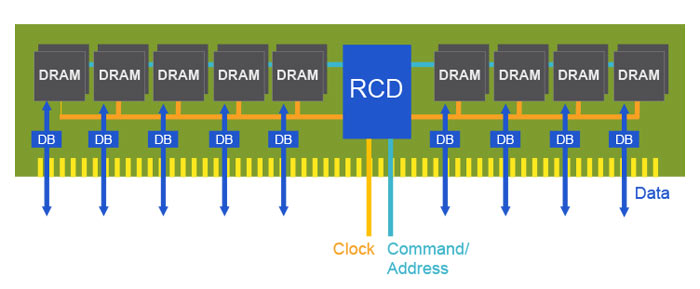
Memory manufactured Rambus has announced it’s got the world’s first fully functional DDR5 memory prototype. The DIMM buffer chipset is aimed at the server market and is the first known instance of next-generation DDR5 memory.

"This is the very first silicon-proven memory buffer chip prototype capable of achieving the speeds required for the upcoming DDR5 standard. Data-intensive applications like big data analytics and machine learning will be key drivers for the adoption of DDR5, with enterprise close behind," said Luc Seraphin, senior vice president and general manager of Rambus.

DDR5 RAM is Coming in 2019 - TechGaming StudioDDR5 RAM is Coming in 2019 - TechGaming StudioDDR5 RAM is Coming in 2019 - TechGaming StudioDDR5 RAM is Coming in 2019 - TechGaming StudioDDR5 RAM is Coming in 2019 - TechGaming StudioDDR5 RAM is Coming in 2019 - TechGaming StudioDDR5 RAM is Coming in 2019 - TechGaming Studio
The Joint Electronic Devices Engineering Council (JEDEC) has not yet finalized an industry standard for DDR5 memory, but is working on it. DDR5 is expected to double the data rates of DDR4 memory from up to 3.2 gigabits per second to 6.4 Gb/s, resulting in twice the bandwidth at up to 51.2 gigabytes per second, up from 25.6 GB/s.
 JEDEC also previously indicated that DDR5's base frequency will be in the neighborhood of 4800MHz (DDR5-4800). That's a tick higher than recently announced DDR4-4600 memory kits from Corsair and G.Skill.
DDR5 RAM is Coming in 2019 - TechGaming StudioDDR5 RAM is Coming in 2019 - TechGaming StudioDDR5 RAM is Coming in 2019 - TechGaming StudioDDR5 RAM is Coming in 2019 - TechGaming StudioDDR5 RAM is Coming in 2019 - TechGaming Studio
It will probably be 2019 before we see industry standard DDR5 memory kits emerge, the first of which are likely to target servers. Eventually there will be DDR5 memory for consumer desktops.

Follow Us @soratemplates